


Update or upgrade a QUADOA Optical CAD license
To update or upgrade a QUADOA license, you send a C2V file with your current license data to QUADOA and apply the V2C update file you receive back. This works for USB dongles as well as for software licenses on a computer or server.
Key points
- This guide covers license updates only. To update the software, simply install the latest version from the Download Center; if your license is valid and up to date, it runs without a license update.
- Hardware license: connect the USB dongle to a computer with QUADOA installed.
- Software license: work on the computer or server where the license is installed.
- Step A: create a C2V file and e-mail it to info@quadoa.com. Step B: apply the V2C update file.
Step A: Create the C2V file
The C2V file (Customer to Vendor) sends your current license information to QUADOA.
- Open the Sentinel Admin Control Center: Open the Sentinel Admin Control Center (ACC) in your web browser at http://localhost:1947/. The ACC runs locally on the computer; this address does not open an external website.
- Create the C2V file: Open the Sentinel Keys tab.
- Find the entry with Vendor ID 91313 and Location Local.
- In this row, click C2V on the far right under Actions to create a new C2V file.
- Save the C2V file and e-mail it to info@quadoa.com or to your QUADOA representative.
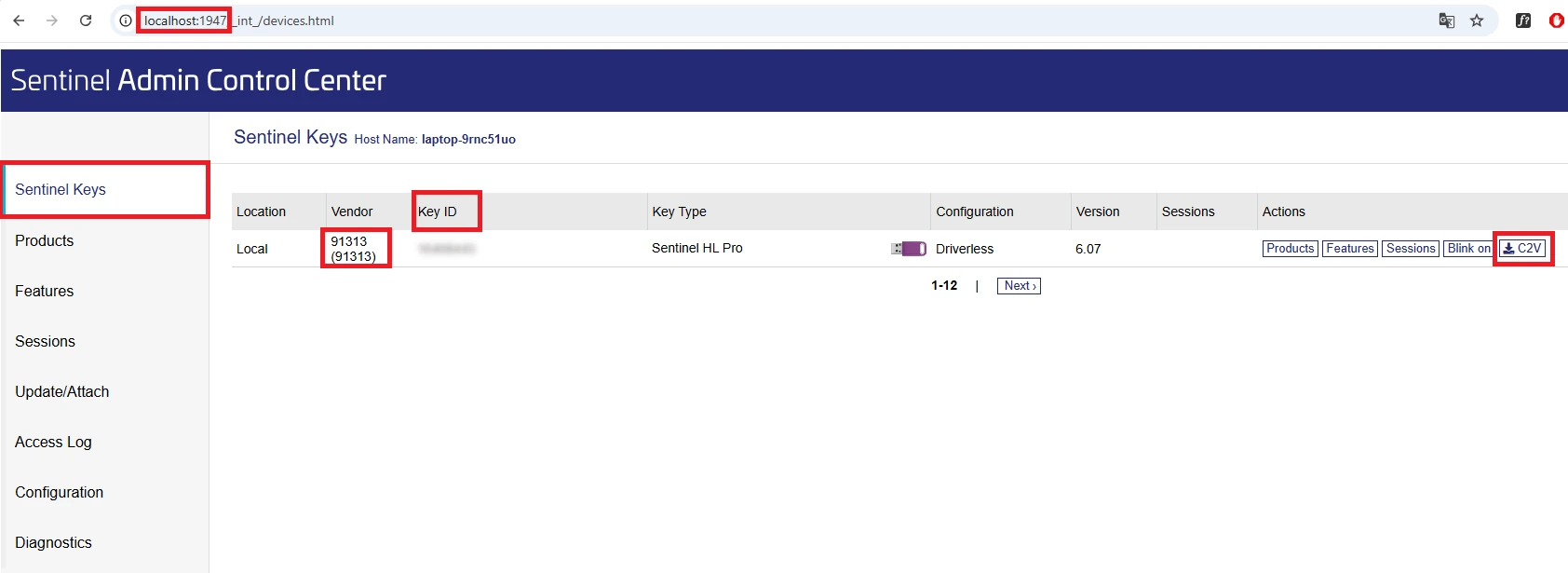
Sentinel Keys tab with the C2V action. - Wait for the V2C file: QUADOA sends you a V2C update file. Once you have received it, continue with Step B.
Step B: Apply the V2C update file
- Open the Sentinel Admin Control Center: Open the Sentinel Admin Control Center (ACC) in your web browser at http://localhost:1947/. The ACC runs locally on the computer; this address does not open an external website.
- Select the update file: Open the Update/Attach tab and select the V2C update file provided by QUADOA.
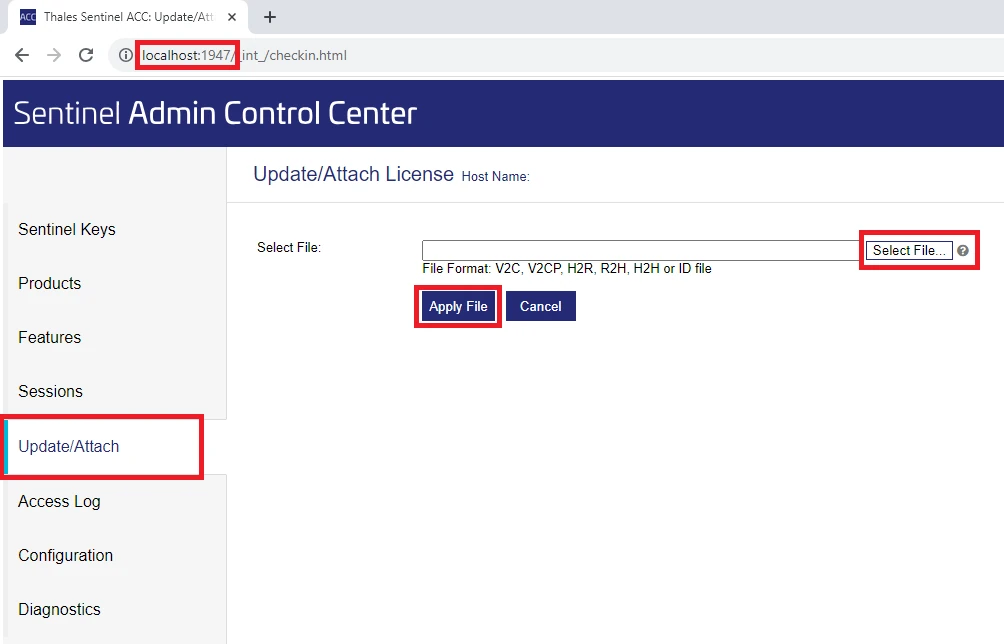
Update/Attach tab of the ACC. - Apply the file: Click Apply File to update the USB dongle, computer or server. A confirmation message appears when the update was successful.
Frequently asked questions
No. Download and install the latest version from the Download Center. If your license is valid and up to date, the new version runs without a license update.
Connect the dongle to a computer with QUADOA installed, create a C2V file in the Sentinel Admin Control Center, send it to info@quadoa.com and apply the V2C update file you receive under Update/Attach.
E-mail it to info@quadoa.com or to your personal QUADOA representative.