Freeform and Stack Definition: the Surface Form Stack Ability in QUADOA® Optical CAD
The Surface Form Stack Ability of QUADOA® Optical CAD lets you combine many surface properties on a single surface: any number of forms, phases, apertures, obscurations, operators and polarization elements, plus one coating and scatter models. Instead of choosing one surface type, you build up the surface from layers; the sag of the surface is the sum of all its forms. This tutorial adds an asphere, a Gaussian peak and cosine structures to the same surface of a singlet lens.
Key points
- Every new surface starts with a spherical form.
- Add forms with a right-click on the surface → Add Form, or from the Construction or Coatings tab.
- Forms are added on top of each other; the total sag is the sum of all forms, and there is no limit to their number.
- Combinable items include aspheres, Zernike polynomials, measurement data, phase functions, apertures, polarizers, retarders and scatter.
- Each surface can have only one coating; adding a second coating replaces the first.
Terms used in this article
- Surface form
- The mathematical description of a surface shape, for example sphere, asphere or Zernike polynomial.
- Surface Form Stack Ability
- QUADOA® feature for combining any number of forms and surface properties on one surface.
- Freeform surface
- A surface without rotational symmetry, described for example by Zernike or polynomial terms.
What is the Surface Form Stack Ability?
In many optical design programs, a surface has exactly one surface type. In QUADOA®, a surface is a stack: you can add as many forms and properties as needed, and they act together. For the shape, the rule is simple: the sag of the surface is the sum of the sags of all form objects, z(x, y) = Σ zn(x, y). This makes it possible to model, for example, an asphere with a measured deviation, or a freeform with a diffractive phase and a coating, on one surface.
How to add a form to a surface
- Open the Optical Design Editor via the Windows icon.
- Select the surface, for example surface 1 of a singlet lens. Without additional forms, it is spherical.
- Right-click the surface, choose Add Form and select the form, for example Asphere. Alternatively, select the surface and choose the form in the Construction or Coatings tab.
- Enter the parameters of the form. The 3D view updates immediately.
How to combine several forms
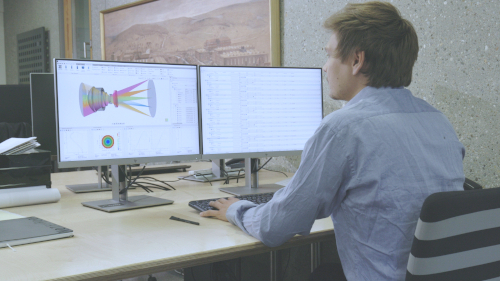
Repeat Add Form on the same surface to stack further forms. In the video, a Gaussian peak and then cosine structures are added on top of the asphere. The example has no optical purpose; it demonstrates that any number of forms can be combined.
To replace a form description without changing the shape, for example an asphere by a Q-type asphere, use the Convert Surface Form Wizard.
Which properties can be stacked on a surface?
| Category | Examples |
|---|---|
| Forms | Basic forms (asphere, QCon and QBfs asphere, Gaussian peak for local defects, cosine and periodic structures for surface errors of a given spatial frequency, and more) and polynomial forms (Zernike, XYZ, Chebyshev and others); user-defined forms via Python |
| Measured data | Imported data, for example from interferometric measurements (see measurement and FEM data) |
| Phases | Phase functions, for example for diffractive surfaces |
| Apertures and obscurations | Circular, rectangular, elliptic, annular and hexagonal apertures, obscurations. The first aperture defines the physical size of the surface, further apertures the clear aperture. |
| Operators | Array and hex array (for example micro-lens arrays), transformation (decenter, rotate, scale) and Fresnel operators, applied to the forms or phases added below them |
| Coating | One coating per surface; a new coating replaces the existing one |
| Polarization elements | Polarizers, retarders and other elements; several per surface are possible, one is applied per ray–surface interaction |
| Scatter | Scatter models |
Video tutorial: freeform and stack definition
This 4-minute video shows how to add and combine several forms on one surface with the Surface Form Stack Ability.
Video length: 3:38 min · Also on YouTube: Freeform and Stack Definition in QUADOA® Optical CAD
Frequently asked questions
Yes. With the Surface Form Stack Ability you can add any number of forms to one surface, for example an asphere plus Zernike terms or measured deviations.
Right-click the surface in the Optical Design Editor, choose Add Form and select the form, or select the surface and choose the form in the Construction or Coatings tab.
Every new surface is spherical until another form is added.
Any number of forms, phases, apertures, obscurations, operators and polarization elements, plus scatter models. Each surface can carry only one coating.
The sag of the surface is the sum of the sags of all form objects on that surface.