

Media Center Watch the latest QUADOA® Optical CAD Videos YouTube channel

First-Order Thermal Analysis of a Beam Expander in Quadoa

This tutorial demonstrates how to perform a first-order thermal analysis in Quadoa Optical CAD. As an example, a Kepler-type beam expander model is used. The objective of this tutorial is to optimize the system in order to obtain a well corrected system over a temperature range from -20°C to +80°C.

System Overview

The beam expander consists of two plano-aspheric lenses. The first lens focuses the incoming beam to an intermediate focal point, while the second lens re-collimates the beam. Both optical lenses are aspheric. Each asphere is mounted in a monolithic steel housing using seat mounts. The nominal system is defined at an environmental temperature of 20°C.
First-Order Thermal Analysis of a Beam Expander in QUADOA® Optical CAD
First-Order Thermal Analysis of a Beam Expander in Quadoa

Multi-Configuration Setup

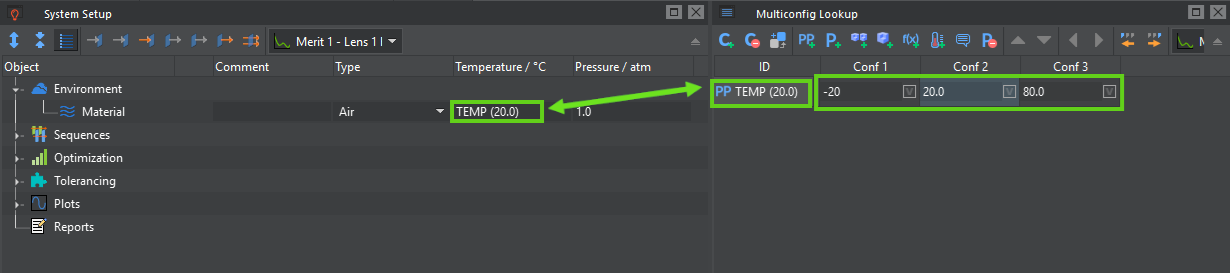
As a preparation for the thermal analysis, the first step is to define a multi-configuration with three configurations within the Multiconfig Lookup Editor. Each configuration is used to define one temperature state of the global environment. In the second step, a Multiconfig parameter is added to represent the system temperature. In this example, we name it “TEMP”. We can now set the temperature for each of the three configurations; in this example, the values are –20°C, +20°C, and +80°C. To affect the global environmental temperature, the parameter must be referenced by the "Temperature" parameter of the global environment material. This is achieved by entering the parameter name "TEMP" into the environment material's "Temperature" parameter. Now, when switching between configurations, the system's environmental temperature changes according to the values defined in the Multiconfig table. As a result, changes in the wavefront (mainly defocus) become visible as the system temperature varies. These changes are primarily caused by temperature-dependent refractive index changes of the lens materials, as well as by changes in the refractive index of the surrounding air.
Defining a Temperature Parameter in the Multiconfig-Lookup in QUADOA® Optical CAD
Defining a Temperature Parameter in the Multiconfig-Lookup
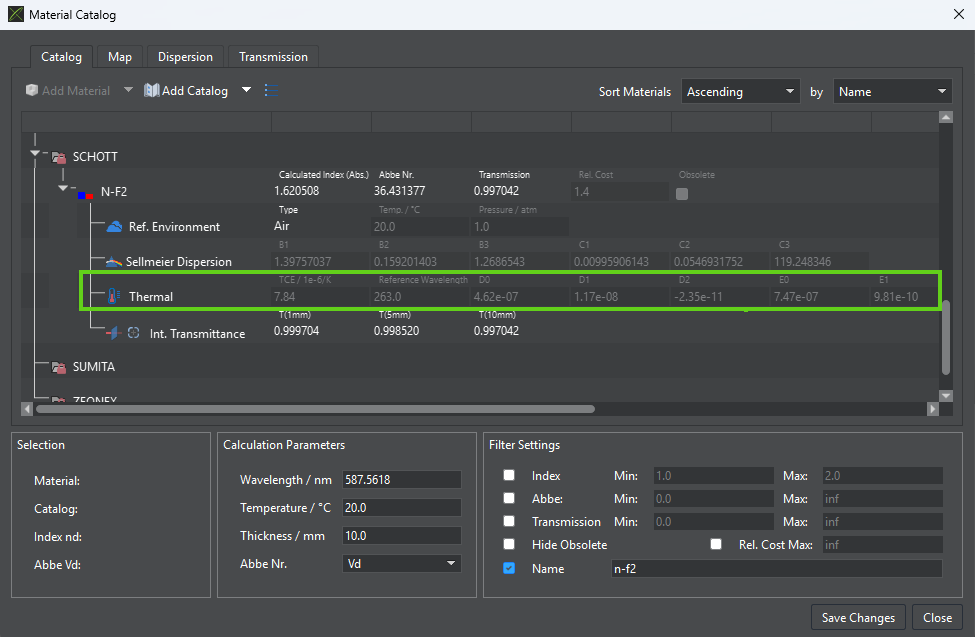
The refractive index change, dn/dT, is calculated from the thermal dispersion coefficients D0, D1, D2, E0, and E1, which are available in the Material Catalog. (For materials for which no thermal data is available, temperature changes do not affect the refractive index.)
Thermal Dispersion Coefficients in QUADOA® Optical CAD
Thermal Dispersion Coefficients in the Materials Catalog
Note: If individual optical elements need to operate at a temperature different from the global system temperature, the "Is Thermal" parameter can be enabled in the Optical Design Editor. This parameter allows a separate temperature to be assigned to a specific lens or optical component. Another option, which is not used in this tutorial, is to define local sub-environments with different materials and temperature values. This is especially useful when designing immersion lenses, vacuum chambers, or other systems that require modeling more than one environment. In this tutorial, the system is kept at a uniform temperature, and only the global environment is used.

Thermal Expansion of Optical Elements

In addition to refractive index changes, the physical expansion of optical elements caused by temperature variations must also be considered. This behavior is described by the thermal coefficient of expansion (TCE), which defines the relative change in dimensions per degree of temperature change and is typically expressed in units of 1/K (or ppm/K). For optical components, the TCE determines how parameters such as lens thickness, radii of curvature, and overall geometry expand or contract with temperature. Even small geometric changes can significantly affect optical performance, leading to focus shifts or additional aberrations. The TCE parameter is also available in the Material Catalog. Thermal expansion can be enabled by activating the "Scale Thermally" option for an element in the Optical Design Editor. When enabled, Quadoa automatically scales the element according to the TCE. This feature is not limited to spherical surfaces but applies to all surface types available in Quadoa, including aspheres and freeform geometries.
Thermal Coefficient of Expansion (TCE) in the Materials Catalog in QUADOA® Optical CAD
Thermal Coefficient of Expansion (TCE) in the Materials Catalog
The effects can be analyzed using any of the available analysis tools, such as wavefront plots or PSF/MTF analysis. Furthermore, a useful way to directly visualize the effect in the Optical Design Editor is to temporarily set the temperature to an unrealistically high value, for example 1000°C. In this case, most analysis tools will not produce meaningful results because the temperature is far outside both the linear scaling range and the valid range of the thermal dispersion formula. However, the effects of thermal scaling, which are typically too small to be directly visible, can now be observed directly in the 3D view.

Mechanical Mounting and Thermal Lengths
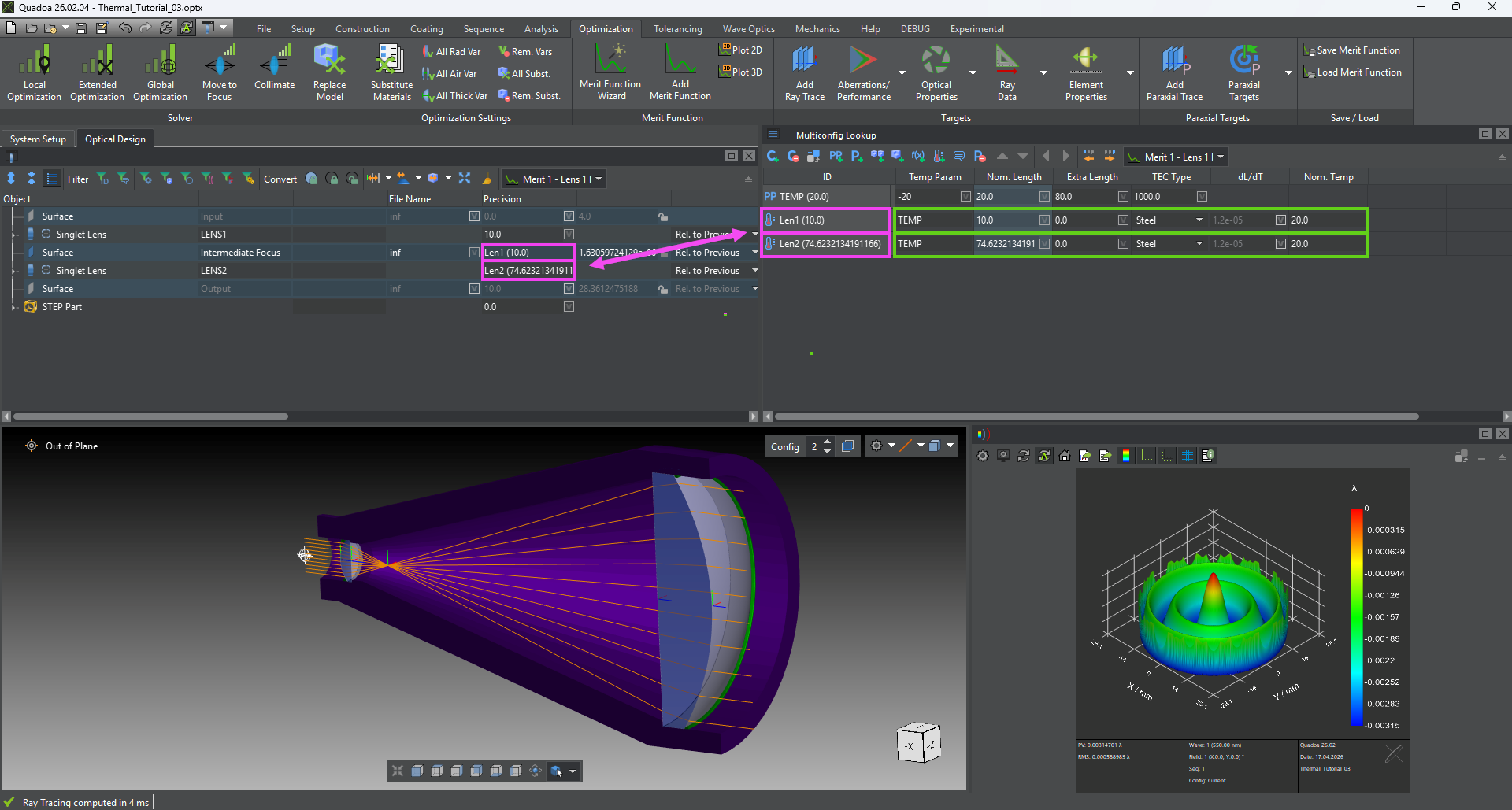
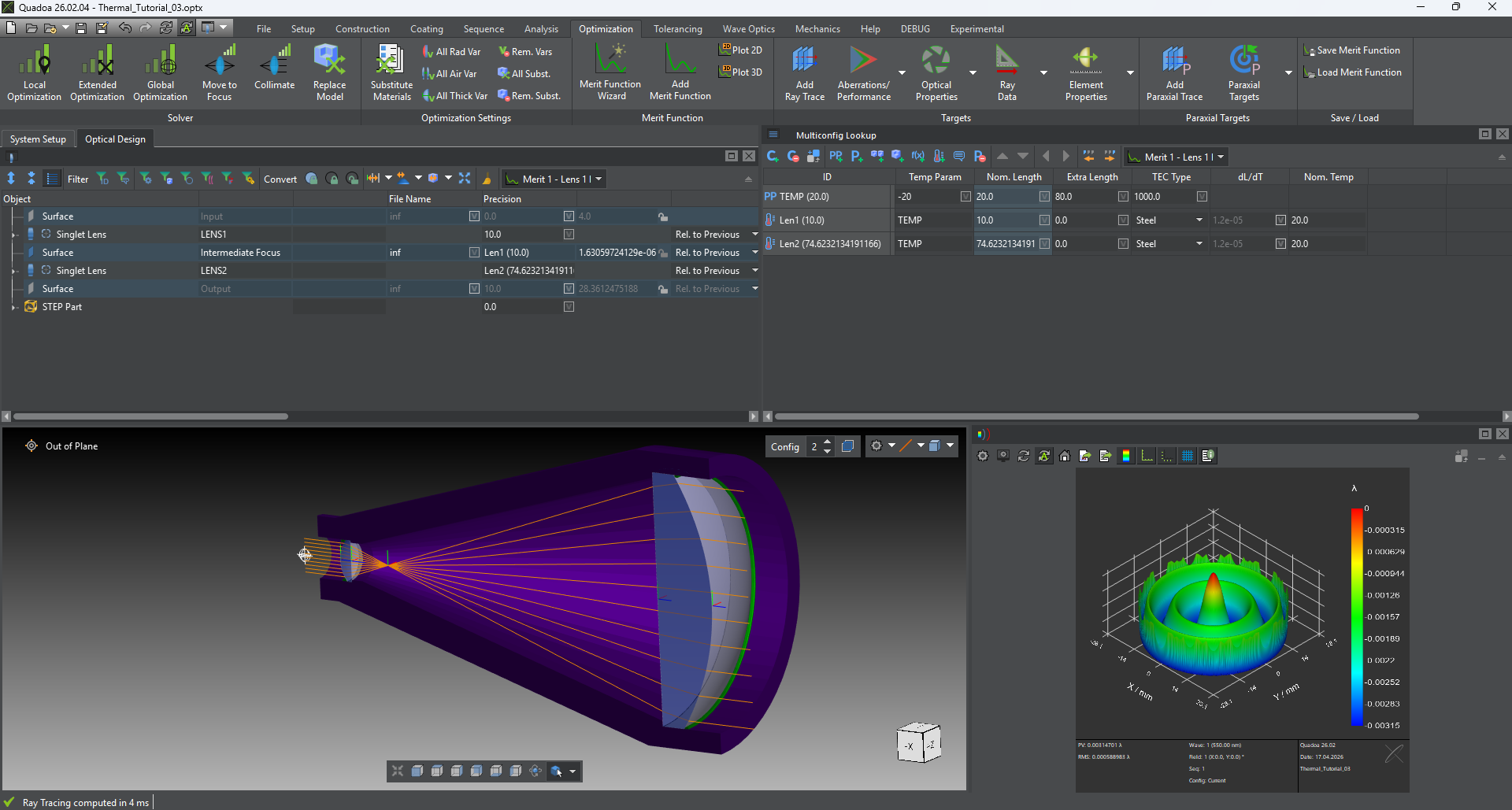
As a final step in performing a comprehensive first-order thermal analysis, the mechanical elements must be considered in addition to the optical elements. For this tutorial, a monolithic steel component (illustrated in purple) with two seat mounts - one for each lens - is used. The lenses are mounted on the seats and are held in place by retaining rings (illustrated in green). As a result of the mounting geometry, any thermally induced expansion of the mechanical structure leads to a corresponding change in the axial distance between the two mounting reference surfaces, directly affecting the optical spacing within the system model. To account for the thermal expansion of the mechanical mounting, a thermal length is defined in the Multi-Config Lookup. In this example, two thermal lengths - "Len1" and "Len2" - are introduced to preserve the intermediate focal position during temperature variations, if required for further analysis. The temperature is specified using the parameter "TEMP", which was introduced at the beginning of this tutorial. It defines the global system temperature and, consequently, the temperature of the mechanical components as well. A nominal length is then assigned at the reference temperature of 20°C. The nominal length can be copied from the Z-position values in the Optical Design Editor. Next, a material is assigned to the mechanical mounting. This can either be a user-defined material, specified by directly entering the thermal expansion coefficient (TEC), or a standard material selected from the material database, such as aluminum or steel. In this example, steel is assigned to both thermal length parameters, "Len1" and "Len2". Finally, the previously defined Z-position values in the system tree are replaced by the corresponding thermal length parameters, "Len1" and "Len2". With these parameters in place, the thermal expansion effects of the mechanical structure are included in the optical model during temperature changes.
Adding Thermal Lengths Parameters in QUADOA® Optical CAD
Adding Thermal Lengths Parameters

System Optimization Across Temperature

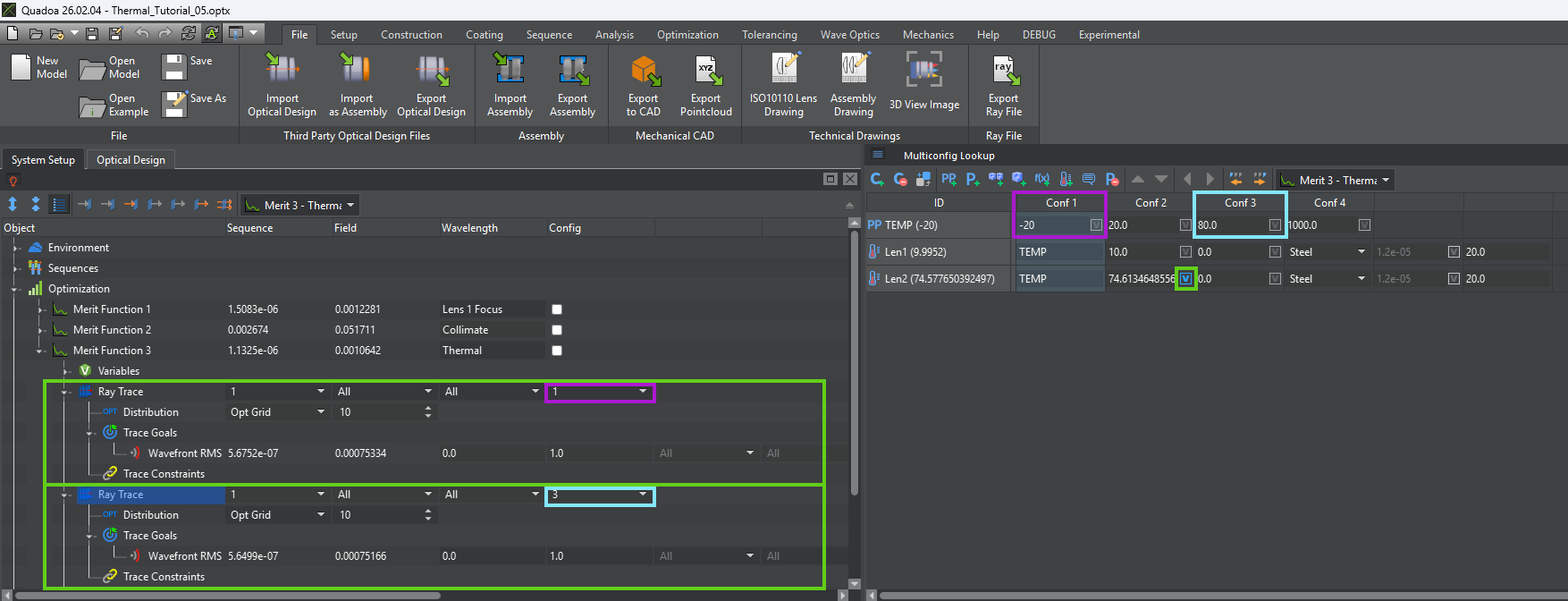
After including all thermal effects, we want to optimize the system to achieve balanced performance across the entire temperature range. Initially, the system shows approximately 1λ of defocus at -20°C and 1.6λ at +80°C. To improve this, a new merit function is defined using the Wavefront RMS error as the optimization target. Ray traces are duplicated for different configurations: one for the minimum temperature of -20°C and one for the maximum temperature of +80°C. This allows for the simultaneous evaluation of system performance at both extremes.

Variable Definition and Optimization

For the optimization, variables must be defined. The Z position of the second lens is selected as a degree of freedom. Since this position is controlled by a thermal length in the Multi-Config Lookup, the corresponding nominal length parameter is set as a variable.
System Optimization Across Temperature in QUADOA® Optical CAD
System Optimization Across Temperature
Now we can run a local optimization to minimize the merit function. After convergence, the system achieves balanced performance: approximately 1.3λ of defocus at both -20°C and +80°C, in opposite directions.

Conclusion

The final design represents a well-balanced compromise across the full temperature range. The system exhibits a maximum defocus of about 1.3λ while accounting for all major thermal effects, including:
    • Thermal expansion of the aspheric lenses.
    • Temperature-dependent changes in refractive index.
    • Mechanical expansion of the mounting structure
By incorporating all relevant effects, this workflow provides a complete first-order thermal analysis of the optical system.